13 Social Media Tools For Businesses

13 Social Media Tools For Businesses 

You’re done writing a social media strategy. You’re probably pretty well-versed in Facebook, Twitter, LinkedIn and so on. Perhaps you’re exploring newer networks like Instagram and Pinterest too.

Well done, you. But the world of social media doesn’t stand still, and it can take all your time just to keep on top of all your communication channels. Here, then, are (a not at all unlucky) 13 social media tools you shouldn’t live without – all to help make your social media life just that little easier.
Hootsuite

Hootsuite

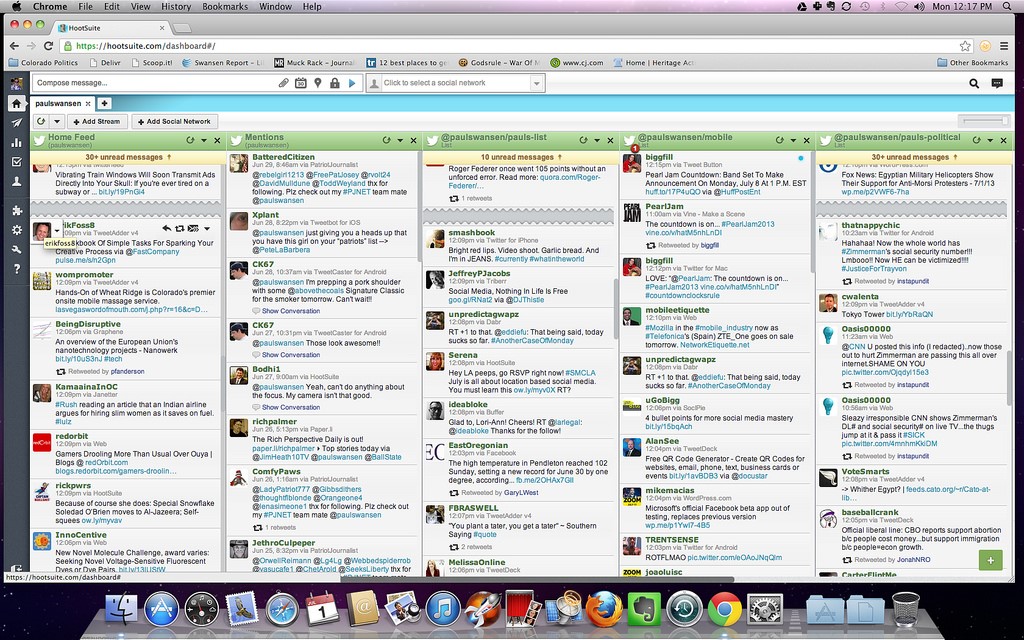
Hootsuite dashboard

Hootsuite is the go-to social media management platform for a lot of people and allows you to view all your Twitter, Facebook, LinkedIn or Google Plus posts on the same screen. So, for example, you might have a page set up showing your Twitter feed, sent Tweets and results for a hashtag you’re interested in, as well as the latest posts from your Facebook wall. There are some powerful analytics tools too – although these cost – letting you see your most popular links, follower growth and so on. A great addition to any SM strategy.
Twitonomy

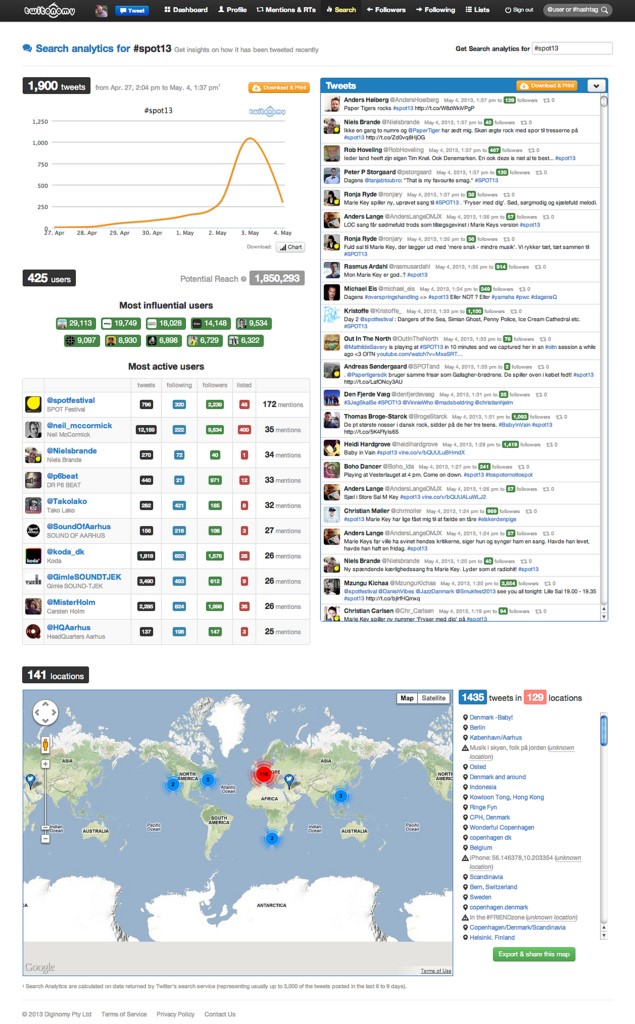
Twitnomy

A Twitter-only tool – did you guess? – but one that’s incredibly useful. It shows you how many tweets you’ve sent over a specified period, how many people have retweeted you over the same time frame, which users retweet you most and the time of day people interact with your tweets most. There’s also a cool ‘mention map’, which drops icons onto a global map to show you where the people who interact with you live. Great stuff. Speaking of mentioning…

Mention

Like Google Alerts, but for social media. Ask Mention to alert you whenever someone mentions your brand on any social media site, and it’ll buzz you whenever it happens. A terrific monitoring tool.

Buffer

One of the best tools around for scheduling your Tweets, Facebook posts and LinkedIn updates.  It’s easy and straightforward to write different posts for different sites ahead of time, and schedule them for any point within the next seven days.
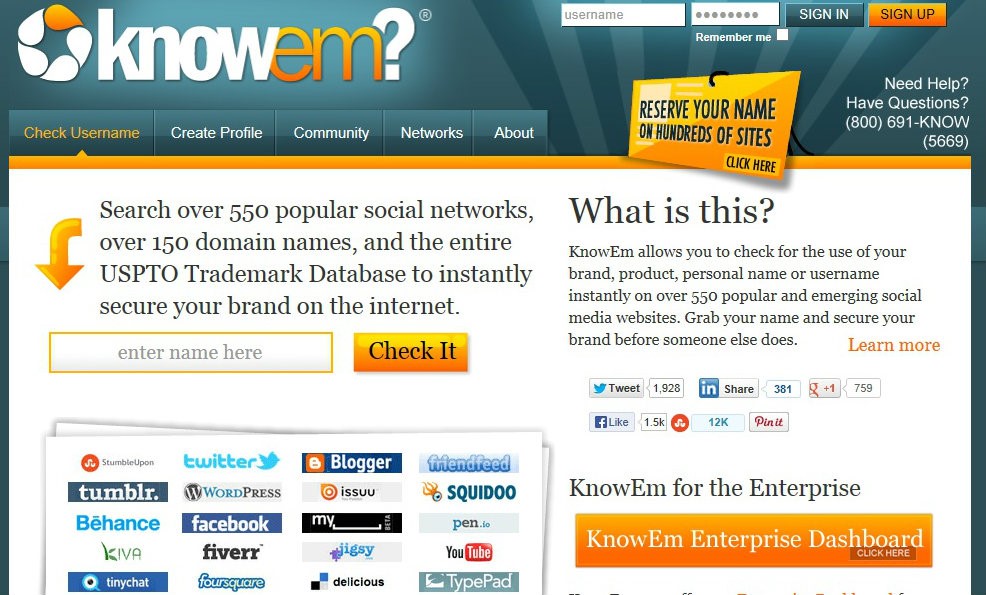
Know Em

Know em

There are so many social media sites you might want to use, and it’s important to keep your brand name the same across them all to avoid confusion. For instance, a fishing supply company might want /topfishingtackle as the suffix to their addresses across Pinterest, Facebook, Twitter, Vimeo, WordPress and so on. Using Know Em means you don’t have to go to each individual site to check the availability of your proposed username – instead, you can just enter it into Know Em and it’ll search them all to tell you whether or not it’s already been taken on each.

Google Analytics

You probably know all about how useful Google Analytics can be for keeping tracks of users and clicks on your website, but it’s equally handy for doing the same on your blog page. You’ll soon know which posts get the most interest, and where from. Likewise, you can also now track social traffic in Analytics, supporting the popular theory that Google is indeed starting to give social more weight and it’s now one of the most SMM tools available for free.

Tweriod

Knowing exactly when your followers are most likely to be online is super-useful, because it means that you can time your Tweets for when they’re most likely to be seen and interacted with. Tweriod can tell you exactly that, and lets you export that data to Excel or as a PDF.

Storify

Storify allows you to take a bunch of Tweets on any topic, sorted by hashtag, and turns them into a lovely looking, easy to digest, chart – including images and videos – which can then be shared elsewhere on the net (they look great on Pinterest). It lets you, for instance, see the full story of that important conference as it unfolded – what happened, what were people saying, did you get the results you needed from the event? It’s fantastic for seeing just what people think of your products or services.

JQuery Pin It

We mentioned Pinterest just then – it’s one of the fastest-growing social networks around. It works by placing a ‘Pin It’ button on your toolbar for you to click whenever you see a page with a great image on it. JQuery, however, allows you to pin an image simply by hovering your mouse cursor over it – making the whole process that tiny, but essential, bit quicker. Vital if Pinterest is central to your social media strategy.

PicMonkey

Facebook’s fantastic, but it’s easy to overlook any captions beneath images if you’re flipping quickly between shots. PicMonkey allows you to quickly and easily add copy onto pictures before posting, without any awkward messing about in PhotoShop.

Tagboard

Now that hashtags have transcended Twitter and moved on Facebook and Google Plus, you need a tool that lets you search for hashtags across multiple social media. Enter Tagboard, which does… well, exactly that. Find out if that topic you’re interested in is being discussed across multiple media by searching for its hashtag on Tagboard.
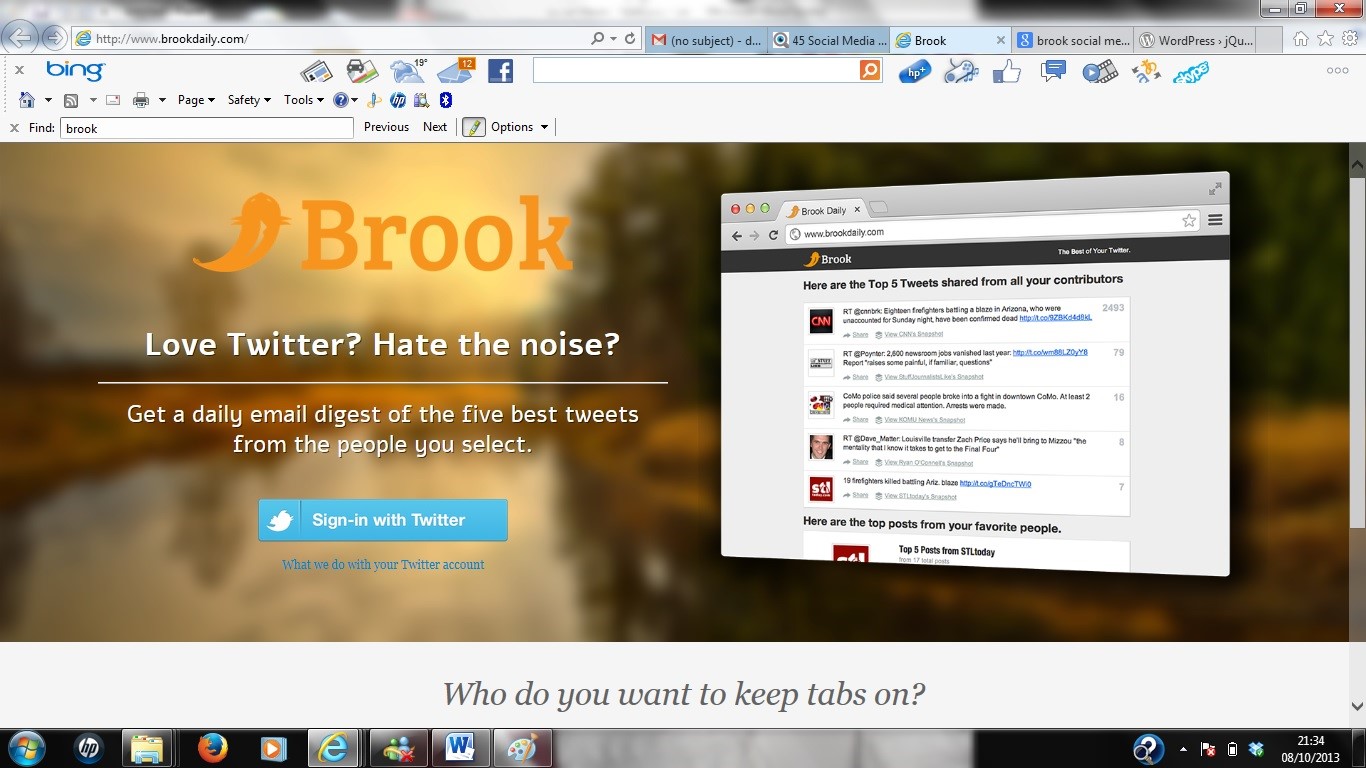
Brook

Brook

Who influences your audience? Whoever it is, it’s sensible to take an interest in their interests – and that’s what Brook is handy for. It lets you set up a list of key influencers, and sends you an email each day summarising the most popular tweets they’ve sent. And that means you can tailor your tweets to them, and there’s more chance of them promoting your content to your target audience.

Leadplayer

Those of you who use YouTube or Daily Motion a lot should be using Leadplayer.  It’s a very quick and easy tool that lets you slap a call to action onto your videos before you upload them – for instance, you could ask people to enter their email address to subscribe to your newsletter, or simply insert a ‘visit our website here’ message. Sorted.

That’s 13 social media tools to really boost your online effort – play around with them and see what works for you. But that’s just the tip of the iceberg – a Google search will reveal stacks of other toys to try, and new ones launch endlessly.

Social media never stands still, so you can’t afford to either.
SEO & Hosting – Is VPS The Best Solution For 2014?

Choosing a web host for your site is slightly bewildering sometimes as there is an enormous amount of choice available. If you’re a web designer, you may want to use hosting that gives you a dedicated server, rather than a shared one, although this will be more expensive.

However, the advent of cloud computing has changed slightly and it’s now possible to have a virtual private server which looks to the outside world as if it’s all yours.

What is a virtual private server?

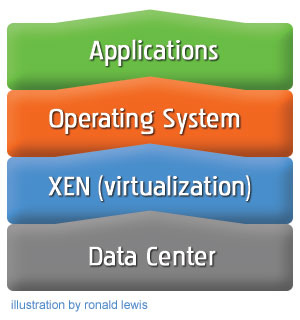
Essentially, it’s a virtual machine that acts as if it’s a standalone computer on a shared server. The server itself might run several virtual machines but they run independently of each other and can even run separate operating systems.

 Best Ecommerce Hosting Solution

Photo credit: Ronald Lewis

The virtual server generally runs on a network cluster of high-end servers in a data centre – very secure, usually fast and offer an increased uptime. This is because if a piece of hardware fails on one machine then it can be quickly and easily routed to another part of the network. Bear in mind that whilst there are free virtual servers available, they do not tend to be of high quality – which is the point of having one in the first place!

OK, what does this have to do with SEO?

For a start, VPS hosting is generally faster than a site hosted on a shared server. This is because with a virtual server, you are allocated your own resources such as CPU, storage and memory usage and don’t have to share with others.

In contrast, shared hosting means that you have to share resources. This can be tricky as not all websites use the same and so you may have one or two sites on the physical server that use more resources than you, slowing your site down as it has less.

This isn’t always the case, many hosting companies allocate a certain amount of resources to each site. However, if one site is using a lot, then it can be difficult to pin them down and take action.

Speed matters

Site speed and SEO work hand in hand. Whilst it’s not necessarily one of the most important aspects to the average small business SEO strategy, it does have some bearing as it’s one of the things that the algorithms look at.

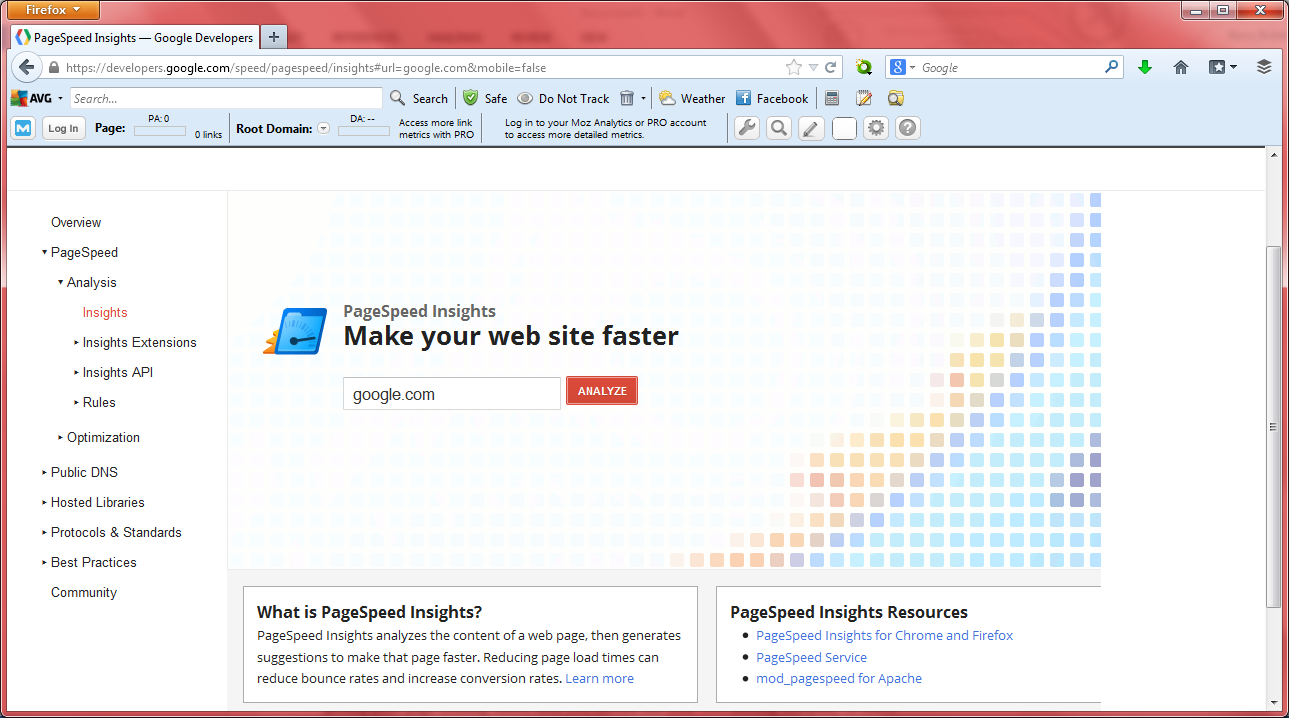
Whilst of course it may not be your hosting that is slowing your site down, it could be the site architecture, it’s certainly something to check out. In order to determine how Google scores your site for speed, check out the speed test utility on the developer website.

As you can see, this is a simple utility that you can use by simply tying in the URL of the site you want to check.

 page speed

If there’s a problem with your site, you can also opt to take the PageSpeed Report which is displayed to the left of the page towards the top. This gives you a detailed breakdown of what could be improved upon and will tell you if the problem lies with your host.

For SEO, the search engines will rank you lower if your site is slow as it’s not ideal for the user experience. In fact, faster sites also enjoy bigger conversion rates, so it’s certainly something you should look at. If it’s a site problem you can sign up for Google’s PageSpeed service which at the moment they are offering for free.

Uptime and downtime

I’m pretty sure that I’ve never seen a hosting company display a high downtime percentage in their sales literature and most will be acceptable anyway. However, not all hosts are created equally, so it’s worth checking out reviews on the downtime others experience before choosing.

With a VPS, this isn’t necessary as barring a major disaster, downtimes are minimal. This is because, as I mentioned earlier, if one part of the network fails, the site can be routed to another, in most cases without you even noticing. As mentioned the free virtual servers tend to be lower quality and therefore, the downtime is going to be more frequent.

A site that has a lot of outages will be noticed by the search engines and labelled unreliable, so make sure your host offers a stable solution and further guarantee better uptime with a VPS.

Spam sites on a shared server

If you’re on a shared server and you’re unwittingly sharing it with domains that have been blacklisted for spamming, then you could be tarred with the same brush by search engines.

Whilst this isn’t something that you have to worry about extensively in general, it does happen and can be avoided with the use of a virtual server as it looks to the outside world like you have a server all to yourself. Essentially you do; a virtual server might share a physical machine, but it also runs independently to other virtual machines and is stand alone.

Google’s Matt Cutts says that there is little need to worry if you discover that you’re sharing a server with a blacklisted domain, but it’s better to be safe. He also points out that if you’re sharing a server with a number of spam domains, then you’re likely to be viewed with suspicion.

It’s not something that should be taken lightly for a business, I once had my mail server blocked due to someone sending me an email from a blacklisted domain and it took a while and a lot of placating clients to put things right.

Location, location, location

Another factor to consider for SEO is the location of the server/data centre. Search engines look at where the site/business is based and whether the host is based in the same country. If it is, then it’s likely to feature higher up in search when people search for your keywords.

Whilst it’s often cheaper to use a host situated in a different country, it’s far from ideal then.

Using a virtual server might not significantly increase SEO, but it does have a number of advantages over using shared servers.

Using Instagram For Business in 2014

More and more people are now signing up for an Instagram business account. It’s one the newest methodologies to hit the digital marketing arena, and businesses are arriving in their droves to take advantage of what it offers by incorporating it into their online SM strategy.

The Meteoric Rise of Instagram

Instagram logo

Photo credit: beta75.se

Instagram is one of the biggest online success stories of recent years. It’s taken the cyber community by storm, first appealing to the social networking side of life, when it launched its first app in October 2010. By December of that same year it had registered over 1 million users, and 6 months later, by June 2010, the number of registered users shot up to 5 million. It’s little wonder that Facebook sat up and took notice, taking Instagram over in April 2012. SM marketing campaigns are one of the last free website promotion techniques to use, so it’s no wonder it’s so popular.

The Organic Growth of Instagram for Business

It’s not Instagram themselves who anticipated this being a promotional platform for businesses. They merely recognised that many of their social users had begun to promote their businesses on their platform, and in response launched the Instagram for business blog, a platform for businesses to interact, post their blogs, and start mixing things up in the business community. It’s fast becoming an integral part efforts on social media for businesses.

Quickly out of the Starting Blocks

The online business community has always been super fast to spot any new opportunities and new ways of marketing their brands. It wasn’t long after the birth of the first major social media sites such as Facebook, Twitter and YouTube, that the corporate world began jumping on the social media band wagon. They were quick to use these new channels for their own promotions, with LinkedIn being the most business orientated.

New Advertising Channel

menu

Photo credit: Faruk Ateş

Getting started with using Instagram for business

At this point in time, Instagram doesn’t differentiate between private social users, and business users. In terms of the sign up procedure, they are one and the same thing. So this means that if you do decide to sign up, you need to be wearing your corporate hat, not your personal one. If your struggling to learn the ropes, there are social media training facilities online that can help you out.

You can of course decide to have both a personal account, and a separate business account, but they are to separate individual entities, and will not therefore permit any interchange between the two. So in terms of your business account, in order to promote brand awareness, you must use your business or brand name. If your planning on setting up an online business, then this is a great place to start; never miss out on a free marketing opportunity!

Creating a Great Business Profile

As with all social media websites, you have the wherewithal to create a profile. All too often (especially with their personal social media websites) people don’t use this facility to the full. But as far as your Instagram business account is concerned, it is crucial that your business profile should be as comprehensive as possible.

To capture your audience’s interest, you must go beyond just facts and figures. Include a little about your business ethics and your company’s mission, and try and link your business to things happening in the outside world.

Link your Instagram Business Account to your Other Websites

The most important thing from a business point of view is to link your Instagram business account to your business’s website. This will allow visitors to view all of the pictures and videos you have downloaded to your instrumental account, simply by clicking on the link shown on your company’s website. You can obtain badges from Instagram that contain this link. It’s also a good idea to put the badge on your company blog too, if you have one.

To further broaden your audience. You can also put this link on any other social media sites you may have, such as Facebook, and Twitter. I don’t think that you can with LinkedIn at the moment, but it would obviously be a useful tool if you could. Why not mention it to LinkedIn? – The more people who ask, the more likely they are to accede.

Uploading Photos and Videos

Whilst you can view photos and videos by simply clicking onto the Instagram website and logging into your account via your computer or laptop, you cannot actually use these devices to upload the photos or videos themselves. This must be done directly from your mobile device.

Choosing the right style photo is key. Don’t forget that it represents your business, so it needs to be relevant. However, if you can mix a little fun in with it as well, that’s all to the good. Statistics show that photos of things like puppies gain far more views than photos of a business meeting in progress, unless of course the business meeting is being chaired by puppy!

Making Best Use of Instagram’s Filters

If you browse a few of the professional business accounts on Instagram, you can’t help but notice the superb quality of the photographs. This is because many people use the advanced filters that Instagram provides. To check out how to use their special effects, simply click through to the help centre on their website.

A Picture is Worth 1000 words…but

As the saying goes, a picture is worth 1000 words. Whilst this is true, (you can depict an image that is almost impossible to describe in words), a few words to elaborate on the message in the picture always works well. It goes a long way towards helping people to engage, and fully appreciate what they are seeing. Instagram provide this facility, so make sure that you use it to best effect.

Engaging with your Audience

As all good marketers know, it is important to engage with your audience. A great way of doing this is by reciprocating the interest that your audience shows in your photos/videos by checking out their photos. By doing this you are showing a genuine interest, which they will appreciate. It will help to increase loyalty.

Monitor your Performance

Someone one said that you can’t manage what you can’t measure, which is why Instagram provide their “Simply Measured” analytics program. It tells you:

  • How effectively you are engaging with your audience
  • Which photos are being most viewed
  • What the latest trends are

The best thing of all – it’s free to use!

Read the Blog

Instagram is still very much the new kid on the block, and despite its enormous success it’s still a work in progress. Things are changing rapidly, (like the launch of the new advertising initiative), and the best way of staying current is to read the Instagram blog regularly.

One thing that is sure, and that is that using Instagram for business is an exciting way of marketing your brand to the world and with a little creativity from you, it can be very successful too.

Segmenting And Analysing Traffic To Increase Online Conversions

Online marketing is driven by  data segmentation, analysis and constant refinement. With so much data available you can easily track exactly what channels are bringing you the best conversions, sales, overall profit etc. This fact, along with natural market shifts is what is pushing businesses to invest more and more in their digital assets.

The amount of customer interaction data available varies from industry to industry. For example an ecommerce business such as Amazon which sells goods online will have a lot more data on what channels directly drive sales. The user takes a trackable action (completing an online checkout) in order to bring revenue to the company.

Other industries that are service based may find it more difficult to track ROI. The user may have to call in or arrange an appointment before committing to a purchase/transaction making the conversion process indirect. In such cases it can become a little more blurred which sources actually put money in the bank. But there are work-around techniques which can help pin-point revenue sources.

The majority of small to medium online businesses don’t look beyond the broad statistics when checking their website traffic flow. There is a large focus on vanity statistics such as overall visits or “hits” as they’re commonly referred to by non-technical staff. This type of data is good to know and it is definitely important; but by no means is it the be all and end all. In most cases only a tiny fraction of your overall traffic will convert; as a decision maker it is your job to identify that money-driving traffic amongst the noise.

If you can find common characteristics among the traffic that is converting, you can fine tune your marketing spend to get a better return on your investment.

SEO-Services-Increase-Traffic

User Tracking

So how can you do this? The best way to do so it by the use of ‘Goals’ in Google Analytics. Goals are trackable actions that can be recorded in Google Analytics when the user does something specified by yourself.

The simplest and easiest way to do this is to create a confirmation page for the action you want to track. So for example if someone purchases a product make sure the checkout process takes them to a thank you page once the transaction is complete. You can then set the URL of this thank you page as a goal. Every time a visitor reaches it a goal completion will be recorded.

Alternatively if you run a business that is not ecommerce based you can set goals for other actions that may lead to a sale. The most common one being an enquiry form submission. If you take users to a confirmation page after the enquiry has been sent then this too can be set as a Google Analytics goal. You would then have data on what type of traffic is bringing in enquiries.

What does this goal completion data mean? It means that you have conversion data that can be cross referenced with almost every other data segment in Google Analytics! This allows you to drive down as deep as you like into the data to find common characteristics among your converting visitors.

See below some of the top data segments to cross-reference with Google Analytics Goal completions:

PPC

Pay Per Click traffic is costly and demand for it is on the increase. As an advertiser you are therefore in a market where costs are soon set to rise even further. This makes it absolutely critical to opitimise your campaigns and make sure each click is best positioned to convert to a sale.

Cross referencing the incoming PPC keyword data with your goal conversions will show you exactly what keyword bids have worked for you (within the selected time period). This will allow you to compare certain campaigns or ad groups on a broad level, or go through your keyword bids with a fine toothcomb.

Paid Third Party Advertising

Paid adverts are often a grey area for businesses as to what exactly (if anything) is driving sales, what is good for brand awareness etc. Goals can help to answer some of those questions and allow you to rearrange your paid ad distribution accordingly.

It is good to be able to check the conversion rate of banner ads and the likes against each other. But what you can also do is compare entire channels against each other. For example banner ads versus PPC; but remember to factor in cost as well as % returns as we’re looking at ROI here.

Search Landing Page

The search engine landing page is one of the best replacements for the organic keyword data Google has recently (not provided). By looking at your organic search traffic and adding the secondary dimension ‘landing page’ you will be able to see what areas of the site visitors are reaching via search engines. You will not know exactly what keyword they used to get there; but it’ll give you an idea.

Having conversion data on your organic search traffic is good as you’ll know which areas of your site to promote, build links to, work on in future campaigns etc.

Email Campaigns

Email marketing campaigns can be one of the most costly ventures that provide little return. If you ever pay for one of those mail blasts you’ll certainly want to use it as a learning experience to pick up some data. In general unless you’ve approached the mail provider to get a paid slot in one of their newsletters the return figures won’t likely make good reading.

If you have managed to build up your own email list then by all means send them regular interesting updates. The goal data you’ll want to set for this will probably not be conversion based (seen as how these people are probably already your customers). Engagement is a more reasonable goal to go for with email campaigns. This can be done by setting a certain time on site, pages per visit or something similar. That way you will know what email content is keeping the visitors on your site once they click through.

Device

We’ve all heard that mobile and tablet browsing is on the increase; but do you know how it performs against your desktop traffic? Most people will not, and looking at the data can give some insights as to why. Perhaps you site isn’t responsive or mobile optimised? Maybe the enquiry form is difficult to fill out on devices with smaller screens? These are all questions you should be asking yourself if you mobile traffic is performing poorly.