Usability: Why it’s Important to Create Content for People

When the web was first born, there wasn’t much to worry about on the usability front, thanks to the format of messaging boards and not much else. It grew, so it became more usable. Then search engines were born meaning that once people realised there were ways and means in which to trick them, the web became less usable.

At one point the combination of black hat SEO techniques, coupled with spammers and so on, made the internet incredibly frustrating.

Things have changed, thankfully, and the web is once more a useful place where you can find information on any subject you’d care to think up. A lot of this can be attributed to the search engine’s fight against spamming and black hat marketing techniques.

Think about sites you like

Now more than ever, it’s necessary to tailor content to suit the user and not the search engine. Whilst content has always been important, it’s now vital to the success of any website and to how a site ranks with the search engines.

It’s not just about the content though, every aspect of a site must be optimised for both the user and search engine, including:

  • Site structure
  • Navigation
  • Page copy
  • Content
  • Social sharing
  • Accessibility

So, it’s necessary to think about both from the very moment of inception, to the stage where a site is built, established and producing content.

Design and site structure

A site that is confusing in any way is likely to see a low conversion rate and this applies to design (including colours and suchlike), navigation and content.

Whilst it’s a good idea from a technical standpoint to ensure that a site is structured logically for the search engine spiders, this doesn’t mean that user navigation should be ignored.

A site that has no real structure, or that makes it difficult for visitors to find their way around, will be abandoned quickly. Likewise, any spelling or grammar mistakes on the home page (or anywhere else for that matter) are likely to have visitors running for the competition.

It must always be borne in mind that the main reason you have a business website is to gain customers and these are real people, not algorithmic robots. The key to this, as with most things in business, is planning.

A project that hasn’t been planned effectively is not always doomed to fail, but it can certainly cause a lot of headaches due to unforeseen events and problems. However, if a site is designed step-by-step, with the designer, content manager and SEO professional all having some input, then it’s success it all but guaranteed.

Breaking it down

Firstly, it should be considered and discussed how the site is going to be used and by whom, so target audience should already have been identified.

Think about:

  • Will it be used on mobile and tablet devices, so needs to be responsive or adaptive, or will you have a separate mobile site built?
  • Does there need to be a lot of information on any one page, can this be broken down into sections?
  • Will you be using graphical elements that could slow the site down such as third-party scripts or Flash?
  • Do you have a strong brand persona to make the site look desirable with a great logo, colour scheme and tone of voice?
  • Will it need interactive elements and/or allow customers to create a login?

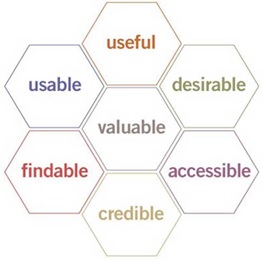
 Website_usability-1 The below ‘honeycomb’ chart is from the government advice website on usability and gives the most important aspects of it when thinking about design. The chart was dreamed up by Peter Morville, who has been involved with information architecture since 1994, working with the likes of Google and Gopher. Based on the 3 circle diagram (above) that looks at content, context and users, this expands the basic idea and gives a framework for designing with usability in mind.
Website_usability-2

 Each of the hexagonal facets can be broken down as follows:

  • Useful: Is the site really useful to its visitors? Why? What does it give them in terms of value? (products, services, information etc.)
  • Usable: Is it easy to use?
  • Desirable: Does the site look good, taking advantage of branding, with nice fonts and colours that match the brand persona?
  • Findable: Again, can visitors find what they need, does it have a search function and a site map for visitors?
  • Accessible: Is the site disability friendly?
  • Credible: Is the site and its content credible, is the information to be trusted? Why?
  • Valuable: Does the site give customer value in terms of satisfaction?

According to Morville, the honeycomb hits several “sweet spots” by serving several purposes at once. Not only can it advance the conversation when it comes to usability, but it also supports a modular approach to design.

This is because the inevitable trade-offs that will have to be made when it comes to drilling down the balance on content, context, users and credibility can be addressed explicitly, rather than subconsciously.

It also allows designers and project teams to scrutinise each aspect of the site individually, rather than as a whole, meaning that boundaries can be pushed and new possibilities explored.

What about SEO?

To some extent usability will dictate to some aspects of SEO, but technical SEO (such as structure and meta information, for example) will remain largely unaffected by this approach. However, in terms of site speed and content, it should be kept in mind that certain things will affect discoverability, such as Flash animations on a front page (gateway page).

Ignoring the fact that Flash is really on its way out, it’s wise to ask yourself what Flash, or any animation or gateway page, really gives in terms of usability. It looks pretty, if it’s been well done, but that’s about it. Flash and SEO don’t generally play well together as Flash essentially hides content from the search engines and distorts analytics data.

 Website_usability-3

Screenshot uses Flash template example from Template Monsters

The above example really gives what can be considered a presentation on a business, which in this case is a template for a digital agency.

Usability covers an awful lot of issues, too much to go into at any one time. This is true of every aspect of site design, which should be considered a project involving a team, rather than the job of a solitary designer coming up with everything.

Right from the very beginning it’s necessary to look at who will use the site, why they will and how they will and how this can be made easier for them, from search to landing to navigation.

This involves elements of design, technical, content and ultimately device, as if a generic responsive site is going to be used, then the mobile and tablet user will also have to be considered.

What this means is that web design, digital marketing and SEO should be considered holistically, rather than as individual parts, with the result being a site that performs well on every level.
Common SEO Oversights: Site Maps

Every website should have a regular audit carried out in order to ensure that it’s performing at the top on its game when it comes to the SERPs. However, it’s also not the priority of many a site owner and so often, important SEO jobs get missed.

In these post Panda/Penguin times, not knowing the rules could have serious consequences for a website and for firms that rely on the web for any part of their business, then ignorance is really no excuse.

It’s a tough world out there on the World Wide Web, and if you’re to compete, then it’s wise to know what the competition are up to and how you can gain an edge over them.

Google algorithms and penalties

For the SEO professional, keeping up to date with Google’s ever-changing algorithms is a job in itself. If it wasn’t, then so many sites wouldn’t be trying to claw their way back up the rankings after a penalty was imposed now.

What I’m getting at here, is don’t think that just because everyone and their dog claims to be an expert in SEO when they land unsolicited in your inbox, that this means it’s simple to carry out. It’s not.

Let’s have a look now at some of the most common oversights people make when it comes to SEO, starting in this article with sitemaps.

Sitemaps

There are two kinds of sitemap, one for the search engine and one for the visitor. The search engine one should be an .xml file that lists all pages that you want indexing by the search engine.

Sitemaps help search engine spiders to locate all of the content on your site that it might miss whilst it’s carrying out a crawl. That’s not to say that your site won’t get indexed without a sitemap, but if you want all of your content to be indexed, then you really should have one.

If you do have a sitemap, then consider the following:

  • Is the sitemap ever updated? If so, when?
  • Do you have a separate one for images and videos?
  • Does the sitemap get uploaded to the server?
  • Does the sitemap you have list all indexable pages?
  • How big is the sitemap, does it contain more than 50,000 URLs or is it bigger than 50MB when uncompressed (unzipped)

If it’s bigger than the above, then you should break down the site map into more than one and it’s also recommended that you resubmit whenever the content on your site changes.

Robots.txt – a note

People often confuse xml sitemaps and robots.txt files, so it’s worth knowing that the latter is different in one key manner. Robots.txt files tell the search engine which URLs you don’t want followed and which you do.

They don’t block these URLs, they simply don’t crawl and index them if certain parts of the site/directories are disallowed. However, it should also be noted that this is advisory and the search engine may still crawl the content, although most don’t.

For an example of what a robot.txt file looks like, check out Google’s here. As you can see, the file uses the terms Disallow and Allow to tell the spiders what to crawl and what not to.

User-agent: *

Disallow: /search

Disallow: /sdch

Disallow: /groups

Disallow: /images

Disallow: /catalogs

Allow: /catalogs/about

Allow: /catalogs/p?

Disallow: /catalogues

Disallow: /news

Allow: /news/directory

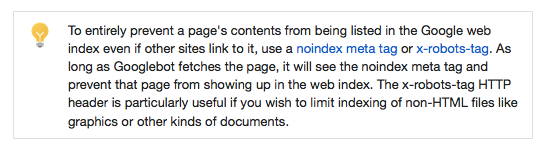
According to Google:

noindex

How to create an xml sitemap

You can create your own sitemap, but why go to the bother when there are lots of resources online that can generate one for you? If you do want to create your own then you will need some coding experience and you can find a full list of the protocols and tags that you will need to use on the sitemap.org website.

If you have a lot of URLs and content, then you may have to create more than one sitemap as well as a sitemap index file, which is the one you will then submit to the search engine. It’s also advisable to create one for media such as video and images too.

Once you have done all this, it’s just a case of submitting the sitemap or index file to the search engines.

That isn’t the end of it though, every time you post fresh content on the site, you should resubmit the sitemap, so that the search engines know to crawl it again. If you regularly put fresh content on the site (as you should), then the search engines will work this out and will be inclined to visit and crawl your site more often.

However, if you only update intermittently, then it’s likely that they will notice this too and come back less often, which will affect your position in the SERPs.

Using newsfeeds as sitemaps

Many of the major search engines also accept RSS (Real Simple Syndication), RSS 2.0, mRSS and Atom 1.0 feeds as a sitemap. Most blogs have one of these feeds and if you use WordPress, then it will have one by default without you having to do anything.

However, the feed might only provide the latest URLs that have been updated, so it’s not the perfect solution. For video content, you can use mRSS (media RSS) or if you just have a basic site that just contains text, with no imagery or video, then you can just provide a list of URLS in a text file, which should look like the below example.

http://www.example.com/file1.html

http://www.example.com/file2.html

http://www.example.com/file3.html

Guidelines:

  • Ensure that you use the full URL
  • Must use UTF-8 encoding
  • List must contain URLs only
  • The file can be called anything but must have a .txt file extension

Whilst UTF-8 encoding may sound like it’s something complex that you should be wary of, it isn’t and you can do this just by creating your file in a text editor such as Sublime Text 2 and hitting ‘save with encoding’ and choosing UTF-8.

To finish this up, I will say that it’s useful to have a sitemap for visitors on your site too, so that usability is taken into account, and it’s a simple matter for your visitors to find what they are looking for.

This can be broken down by:

  • Home
  • About
  • Contact
  • Products
  • Privacy policy
  • Terms and Conditions
  • Blog
  • Blog archives

This is of course a general outline and will depend entirely on how many pages you have on the site and what they are about. Try to make it as simple and logical as you can and it will prove an invaluable resource for your visitors.

Sitemaps are important if you want your regular content to be crawled and indexed by the search engines, and the more you update, the more you will be crawled and the better you will be indexed. This means that it’s not an aspect to SEO that should be ignored if you want to place as well as possible in the SERPs.

Using A Content Marketing Strategy: Getting It Right

There’s so much said on content marketing strategies online that you’d think that all business owners would have got the message by now; content is possibly the most important aspect to your online marketing efforts. Practically every online business idea relies on a high quality content marketing strategy.

However, we all have busy lifestyles and if you’re not constantly working with online marketing, then it can be difficult to keep up with the latest trends and SEO requirements. That doesn’t mean they should be ignored though, internet shopping in the UK is a national pastime and those not taking advantage of it risk losing valuable business.

Content has always been important when it comes to a business site, but it’s even more so now in the post Panda/Penguin days. Google’s drive to rid the search engines and spammers and make the web more useful have made sure of that.

So what kind of content do you need? And what the heck is content marketing?

According to the Content Marketing Institute: “Content marketing is a marketing technique of creating and distributing relevant and valuable content to attract, acquire, and engage a clearly defined and understood target audience – with the objective of driving profitable customer action.”

Seems quite simple right?

The importance of quality

One of the most important aspects to content is the quality. Images ripped from other sites without paying attention to rights, duplicate written content copied from a press release or news story, spun articles, poorly written content, all of this is likely to damage your SEO/SERPs position considerably.

Panda has now been integrated into Google’s main algorithms and according to Matt Cutts, we can expect monthly updates for it now. This means that it’s even more important to ensure that content is:

  • Unique
  • Relevant
  • Of a high quality (grammatically correct with no spelling mistakes and good readability scores)
  • Not stuffed with keywords
  • Follows a logical site structure

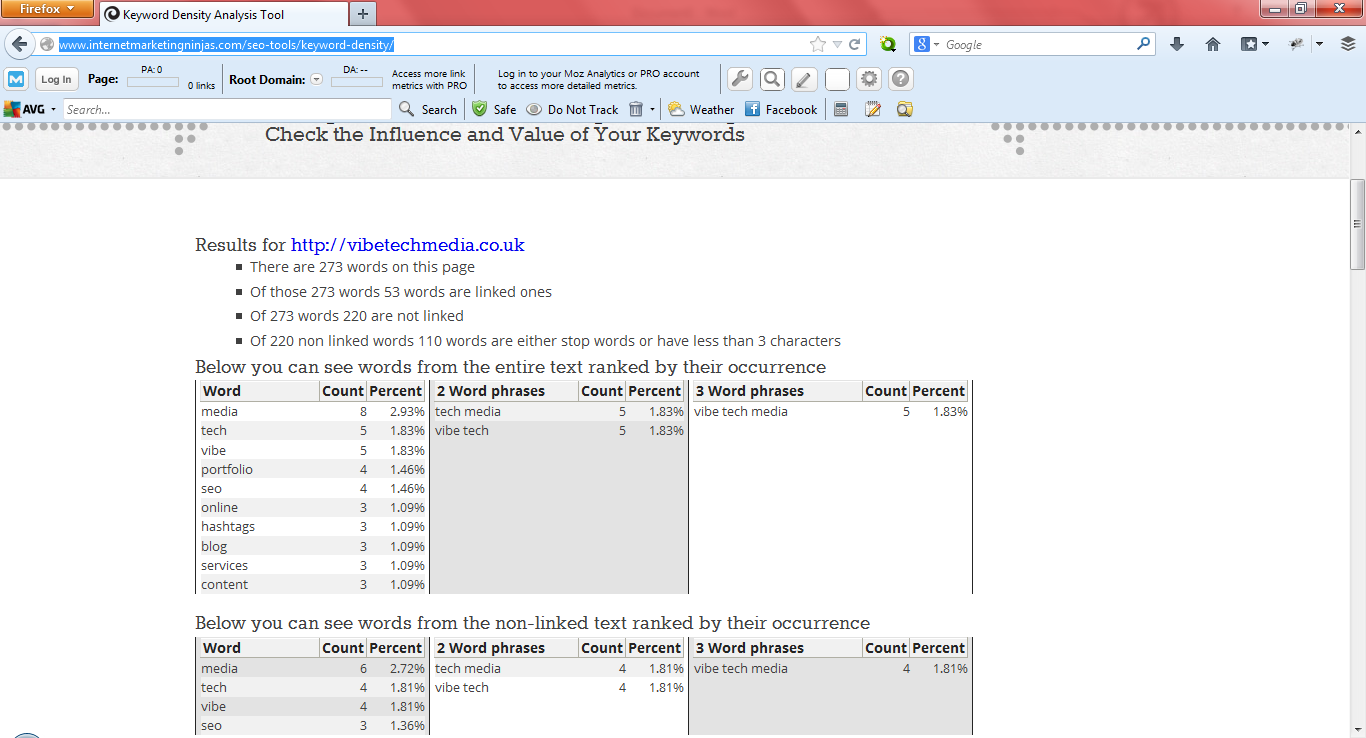
For keywords, there’s a useful tool from Internet Marketing Ninjas that allows you to look quickly and easily at the keyword density for each page. Despite what many site owners seem to think, keywords are no longer the Holy Grail and whilst they remain important, especially for PPC campaigns, they shouldn’t be overused.

This is because if a word or phrase is used over and over again in a block of text, then it obviously doesn’t read well. Many people in the past have used keyword stuffing in an attempt to fool the search engines into ranking them highly, but now Google and the rest of the SEs are having none of it.

 
screen 2

As you can see, the Ninja tool allows you to look at each page, what words are used and the density. This is a healthy-looking page, for example, as whilst it inevitably uses the same keywords here and there, keyword density is never above 1.83%.

This is an important process to carry out, as it’s likely to affect your site badly if it appears that keyword stuffing has been used. Saying that, keywords should be used strategically and it’s good practice to try to include them in titles, at the start of the blog and articles. Choose a key phrase and then a couple of similar, related phrases for the best results.

Types of content

Content doesn’t just mean blog posts and articles and it’s important to understand that the best sites that rank the highest will have a mixture of content that uses different mediums or techniques.

These include:

  • Blogs
  • Articles
  • White papers
  • Presentations
  • Images
  • Videos and video infographics
  • Social media
  • Case studies
  • Testimonials
  • eBooks
  • Infographics
  • Email/newsletters/targeted offers
  • Press releases
  • Mobile apps

Whilst this isn’t an exhaustive list, these are the most commonly used forms of content and a good strategy will encompass many of them. Social has become more important to the search engines and so it’s important to ensure that social sharing buttons and content shared on social networks have some power too.

In the past, white papers have been seen to be one of the most effective content offerings, as these can be presented as downloadable content, which require a short form to be filled in. This allows a site to build a list of leads and an email newsletter database, if the visitor has opted in.

However, SlideShare is quickly growing in popularity as a content marketing tool with many finding it very effective. This is due to the way that bite-sized chunks of information can be presented, which are easier for the audience to take in and digest.

Many people seem to think that email no longer has any value as a marketing tool, but the opposite is true. Email remains very important to online marketing and if you can add personalisation (such as Amazon offers), then all the better.

Strategy and planning

The mistake that many people make when it comes to content is in the lack of planning. A content campaign must be strategized if it’s to be effective.

You should:

  • Consider the target audience/buyer persona
  • Think about the types of content you can use
  • Decide how you’re going to distribute content
  • Who is going to be responsible for what
  • How are you going to promote the content
  • Get together an editorial calendar

Target audience is important and is something you should know already if you’re targeting the same audience as your general marketing plan follows. However, you may want to change this slightly in order to target certain age groups for different products, for example.

As far as distribution goes, think about if you’re going to offer downloadable content for lead generation, or if you’re going to use email, or both. It’s also a good idea to decide which social networks you’re going to share which content with. Don’t dismiss any of them out of hand, whilst LinkedIn may be the ideal B2B choice, there are equally as many business customers using Twitter and Facebook Pages, not to mention YouTube.

You can use social as a tool for distributing and promoting the content as well, so it’s important to recognise just how much bearing it has on SEO.

Editorial calendars

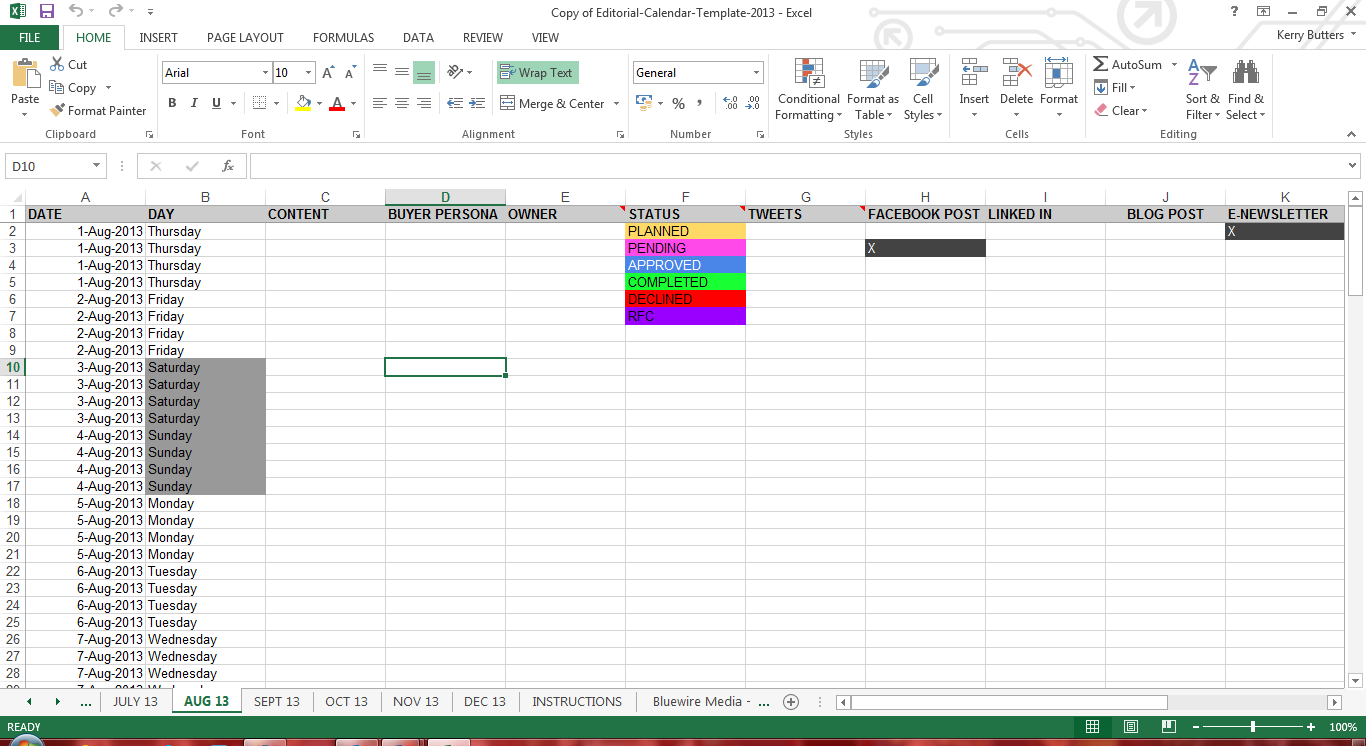
Contrary to popular belief, these are not just for newspapers and publishers and are incredibly useful for planning content. There are plenty of templates to be found online to help you get started and most are in the form of spreadsheets, although others can be integrated into a CMS.

 screen 1

As you can see, this one gives spaces for filling in days, content, buyer persona, status, social and so on. You can use this to plan out content, looking at regular things such as social posts and blogs first.

It’s then a case of planning a few things out. For example, there are some times of the year where you can guarantee the kind of content you will be putting out, such as a competition at Christmas, or a themed week for Easter.

You can also look at what industry events might be taking place over the course of the year that you might be attending and plan Twitter updates and blog posts to cover it. This means that you can up productivity, make sure that everyone knows what’s expected of them and when and save yourself a lot of time thinking up obscure future titles.

Content 101

It’s important that your content is authoritative, so have a look at Google’s Webmaster Central Blog for guidelines on this. Give your site a good look over and remove any content that’s not especially helpful, such as that blog post describing the Christmas party (unless it’s exceptionally funny).

This means getting rid of short, non-informative articles on the site and making sure that you provide a good mix in terms of medium and the length of written content. Whilst many still believe that the premium post size is 300-500 words, this is not the case and Google appear to have been giving more weight to longer pieces of up to 2000 words for blogs and articles.

If you can’t write, then bite the bullet and hire a professional. Copywriters in the digital age tend to have skills in SEO writing and can ensure that they say a lot with few words. Whilst yes, you can find articles that have been written for $2.50, this is highly inadvisable. With content, as with everything else in business, you get what you pay for and if you’re not prepared to pay a professional the going rate, then don’t bother at all.

This is especially true as cheap content is usually ‘spun’, meaning that an existing piece has been taken and put through software which rearranges and alters meanings of the same text. This rarely works out well and you must have come across sites where it reads like gibberish – that’s spun content.

The important of good content can’t be emphasised enough if you want your site to be able to compete with business rivals. SEO is a complex affair all round, but good content is what the majority of it is based upon.

Site Speed and its Impact on SEO

Way back in 2010, Google introduced a new aspect to its algorithms that looked at site speed and the effect it has on SEO. Whilst the changes weren’t massive and overall accounted for just 1% of the overall SEO picture, Google were really flagging up the idea that usability is the key to success.

However, according to a study carried out by Yahoo! and presented at a trade show, there is a direct link with a drop in sales and traffic for slower sites. The presentation found that:

  • A site that’s 500 milliseconds slower than the average load times experienced a 20% drop in traffic on Google
  • On Yahoo! 400 ms slower translated to a 5-9% drop in full page traffic when the user didn’t hang around long enough for a page to fully load
  • Amazon saw a 1% drop in sales when its pages were loading 100 ms slower

The cliché “first impressions count” is very true when it comes to web design, as is performance of a site, as most people won’t wait long before getting fed up and turning to competitor sites.

A study carried out last May found that of the 60,000 consumers asked, 8% said that they leave slow sites whilst making a purchase. You’ve got an insane business idea, great design – speed could be letting you down. However, that doesn’t mean that all 8% would go on to complete the purchase, so the results were studied alongside average conversion rates.

It was found that weighting the average conversion rare for internet shoppers (4.35%) against the value of worldwide global sales (£486bn) and found that eTailers could be losing around £1.73bn per year in lost sales due to badly performing sites.

It also found that average load times for homepages were around 3.5 seconds, but some were as slow as 15 seconds.

Mobile and responsive designs

This is worrying when considered alongside the increasing trend toward using mobile for the internet and responsive design websites, which tend to be slower to load as they send all HTTP requests to the target device. This delivers a full desktop site even when a lot of the content is hidden.

This means that even with internet speeds continually being upgraded, it’s always necessary to look at load times for a site and if necessary, get issues sorted.

For new projects, the idea of building from mobile up, rather than designing for the desktop, makes sense, as this means that performance will be something that’s more likely to be looked at in detail.

What can be done about it?

Firstly, taking a look at Google’s best practices is worth doing, so that you have a clearer idea what’s necessary. Bear in mind that in order to optimise your site, it’s more than likely that you will need to get a designer involved in order to make any changes to code, unless you develop your own site.

It’s probably a good idea to do a site audit in the first instance to pick up any further issues and test the site thoroughly. Google’s page speed tool is also worth using to get as much insight as possible into the reasons for a slow site. Most SEO Consultants and/or site auditors will analyse site speed and find solutions to any problems that are present.

There are plenty of additional tools to be found online that will help you to further drill down exactly what the problem is too.

Images

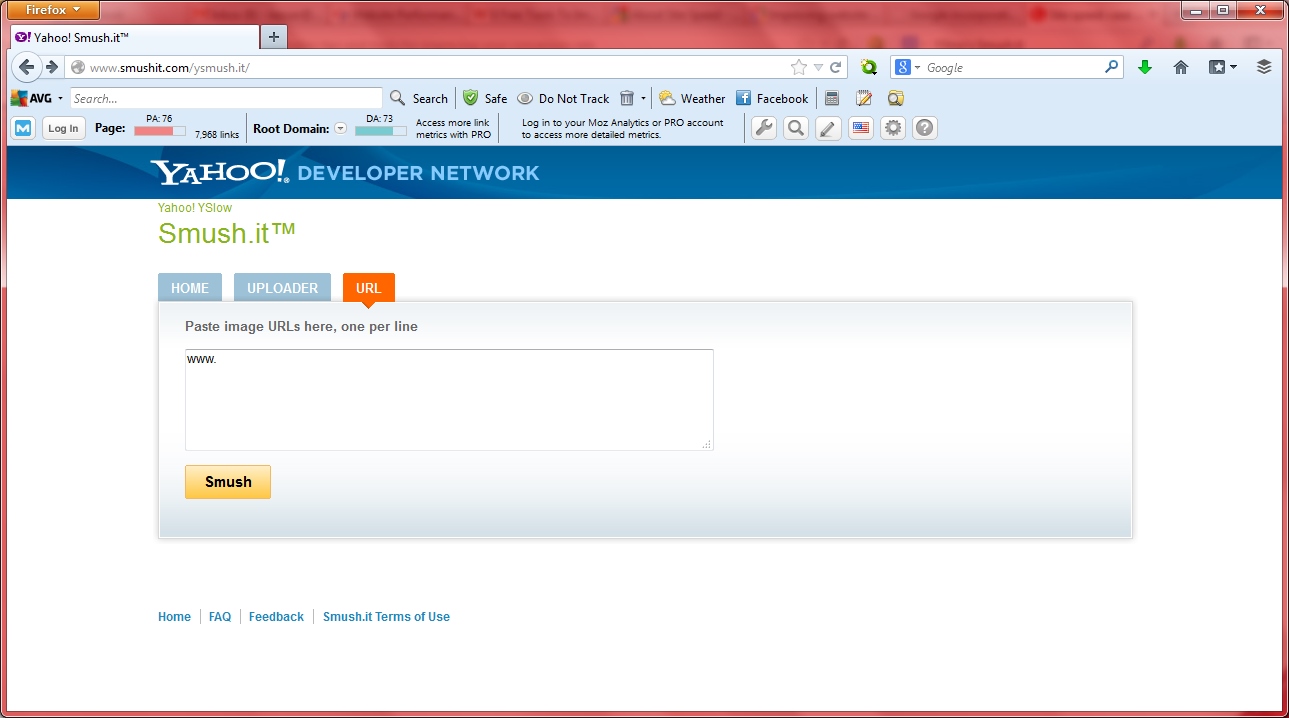
One of the biggest culprits when it comes to loading times has always been images and how much these are optimised. In order to ensure that images are as small as they need to be, you can use a tool such as YSlow’s Smush.it, which easily allows you to reduce image sizes, without compromising on the quality of the image.

 Site Performance and its Effect on SEO - 1

Basically, this allows you to upload files to be reduced, or enter URLs of the pages containing the problem images. The software then reports on how many bytes can be saved and it’s then recommended that you download the resulting zip files and replace the old images on your site with new via FTP.

What about WordPress sites?

Since WordPress has increased in popularity so much, it’s worth mentioning that there are some excellent plugins to be found which can speed up a site.

  • W3 Total Cache
  • WP Clean Up

The latter can really clean up your database very effectively and considerably contribute towards speeding a WP site up. It looks at comments, orphaned data and much more in order to clean up the installation.

W3 Total Cache is also a great plugin and will load pages up to 70% faster, although it’s often necessary to have a fiddle with the configuration before seeing the best results. This means you should test page speeds both before and after configuring the plugin to see what gives the best results.

JavaScript and tracking software

These can often slow your site down, especially with regard to mobile. Whilst it’s important to have social sharing on your site, do you really need a button for each and every social network?

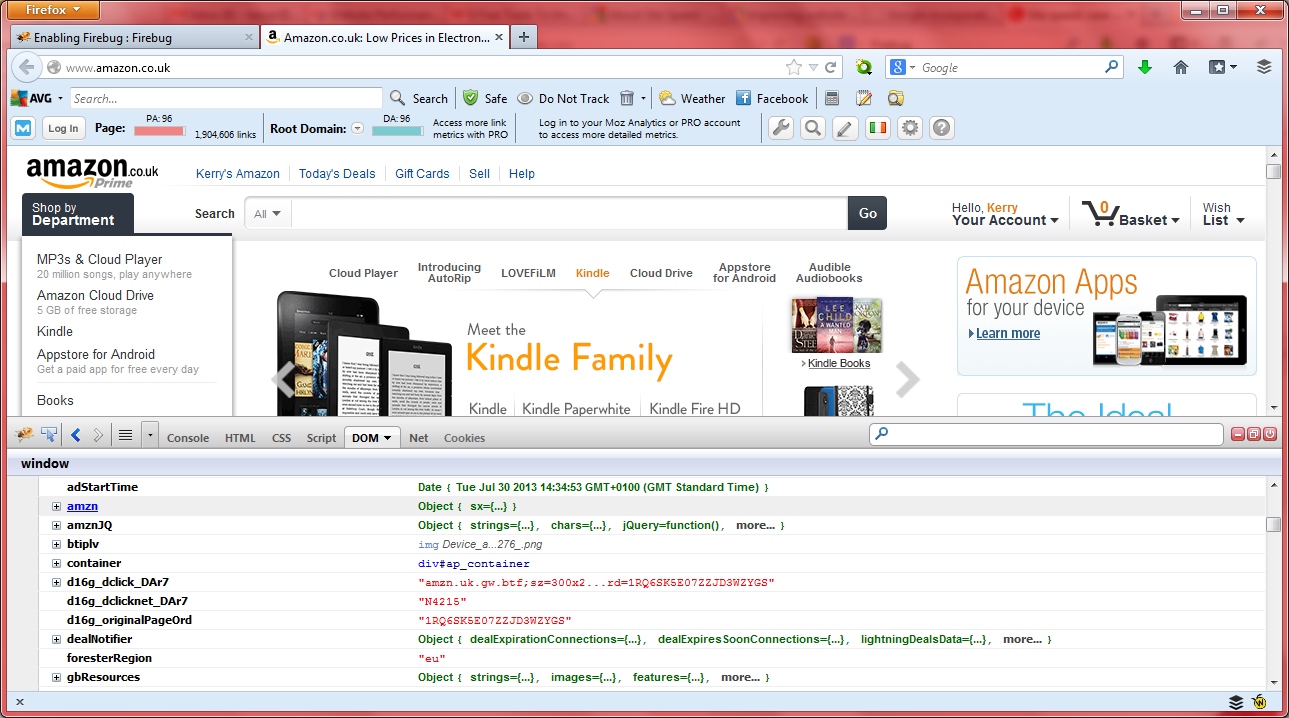
 Site Performance and its Effect on SEO - 2

Firebug allows you to inspect all of the code on a site with a simple browser add-on. Again, you will need to be very familiar with coding and design in order to use this, or discuss it with your developer.

This also allows you to check fonts, CSS, HTML, scripts and much more and is a handy tool for those who are familiar with web development. If your site is older, then it’s a good idea to check for old, not-needed tracking software as this can cause some sites to run slow.

Other issues to consider

What else can be slowing your site down? It could be a number of things that are all combining to make it so, such as:

  • Ad network code is often JavaScript based and can slow load times, check that it’s really worth having
  • Server configuration should be checked to make sure that it applies Gzip compression to HTML, CSS and JavaScript – your sysadmin or hosting company will be able to help with this
  • Shared hosting may have an effect so consider using a virtual dedicated server, or for large sites, a physical dedicated server

When it comes to site speed, it may not be the most important aspect to SEO, but it does have a bearing on how your site converts sales and so it’s important to ensure it loads as quickly as possible – 74% of people accessing a mobile website will leave if it’s not loaded within 5 seconds.